Technical guide
This guide explains how ComposeUI works inside, and how to change it: add a widget, add a backend, and run the checks. To build an app with ComposeUI, read the user guide instead.
Contents
Project layout
src/composeui/
  core/          # toolkit-agnostic: views, signals, renderer base, application, registry
  qtcore/        # Qt backend via qtpy (QtApplication, qtrenderer.py, custom widgets/)
  textualcore/   # Textual (TUI) backend
  webcore/       # Web backend (Starlette + htmx + daisyUI); static/app.css is built
css/             # source of webcore/static/app.css (`make css`; tools land in css/vendor/)
src/examples/    # example apps (pipeform.py, pipecatalogue.py, ...), also used by tests; not in the wheel
tests/           # pytest suite (pytest-qt, pytest-asyncio, Textual run_test pilot)
docs/            # the user guide (user-guide/), the examples guide, this guide, the Sphinx site
Architecture
The core imports no backend
composeui.core never imports a backend (Qt, Textual, Starlette) at import time.
The Qt binding lives entirely in composeui.qtcore. Python imports it only when a view
renders with RendererType.QT. The same is true for Textual and the web.
tests/test_renderer_registry.py checks that importing composeui.core.view imports no
toolkit.
The registry
composeui.core.registry maps renderer keys to the renderers of each backend:
Each
RendererTypemember is a backend. Its value is aBackend, which holds:renderers: the dotted path of the module that exposes theRENDERERSmapping,dict[str, Callable[[Any], Renderer]];applications: the dotted path of the module that exposesAPPLICATIONandMODEL_APPLICATION, the application classes thatcore.application.runstarts;extraandpackages: the extra of the package that installs the backend’s dependencies, and their top-level modules. When the backend’s import fails and one of these modules is missing,runstops and names the extra.
A view names its renderer with its
_renderer_keyclass variable, for example"label".create_renderer(renderer_type, key, view)imports the renderers module of the backend and looks up the key. When the backend doesn’t register the key, it returnsNone, and the view is not rendered. So a partial backend works.A renderer class of the
"router"or"tabs"key can setrenders_on_demand = True, as Qt’s do.RouterandTabViewread it withrenders_on_demand(renderer_type, key).Routerthen renders the shown page, and only the toolbar entry and the dialogs of a page not built yet.TabViewrenders the renderer of eachTabPage, which shows the tab’s title and state, and the tab’s dialogs. The renderer builds the views of a page or a tab the first time it shows. The web and Textual render every page and tab.
The three backends register the same keys except for maps, which Textual omits.
test_every_backend_registers_the_same_renderer_keys_except_graphical_maps checks this contract.
Views and renderers
The views are the view-models of MVVM, and the toolkit objects are the views. The renderers are the binding between them. See How ComposeUI maps to MVVM.
A view is an attrs class. @define_view adds the notify_renderer hook to the
on_setattr of its fields. When code sets a public attribute to a new value, the hook calls
refresh_attribute(name, value) on the renderer of the view. Do not add manual update()
or refresh() calls.
A renderer (composeui.core.renderer.Renderer) binds a view to a toolkit object, its
rendered object. It syncs them in both directions:
Method |
Direction |
Does |
|---|---|---|
|
view to toolkit |
Creates the rendered object. |
|
view to toolkit |
Calls every handler of |
|
view to toolkit |
Calls the handler of one attribute. |
A handler of a widget signal, connected in |
toolkit to view |
Sets the view attribute inside |
_refresh_dispatcher maps each view attribute that the renderer cares about to its
handler. When a view attribute changes and it has no handler,
refresh_attribute raises MissingRefreshAttributeFunctionError.
Inside stop_refresh(), is_updating_state() is true. notify_renderer then doesn’t
refresh the toolkit with the values that came from it.
call_on_main_thread(callback) calls the callback directly by default. Each backend of this
repo overrides it: Qt and Textual run the callback on their main thread, and the web runs it
under the session’s lock. See A button click.
Signals
Signal.connect and Application.connect read the parameter names of a callback:
Signal.connectinjects themain_viewandmodelkeyword arguments when the callback asks for them. The callback gets only as many of the signal’s arguments as it takes.Application.connectalso injectsview, the view that it connects.
These names are part of the API: keep them exact.
View state
MainView.save_state and MainView.load_state serialize the view tree with the cattrs
converter CONVERTER of composeui.core.view. A new view field must stay serializable, or
be excluded:
Fields of the types in
_OMITTED_TYPES(Signal,Renderer,RendererContainer,threading.Timer) are skipped automatically.Other fields that can’t be serialized, such as
Validatorfields, take theOMITmetadata key.Text that the app’s code sets, not the user, takes the
UI_TEXTmetadata key. See Saving and loading state.
A button click
An event goes from the toolkit’s widget to the view, and a change goes back from the view to
the toolkit’s widget. For example, a page has a ButtonView and a LabelView. A callback
connected to the button’s clicked signal sets the label’s text to “Done”. On every backend,
one click does this:
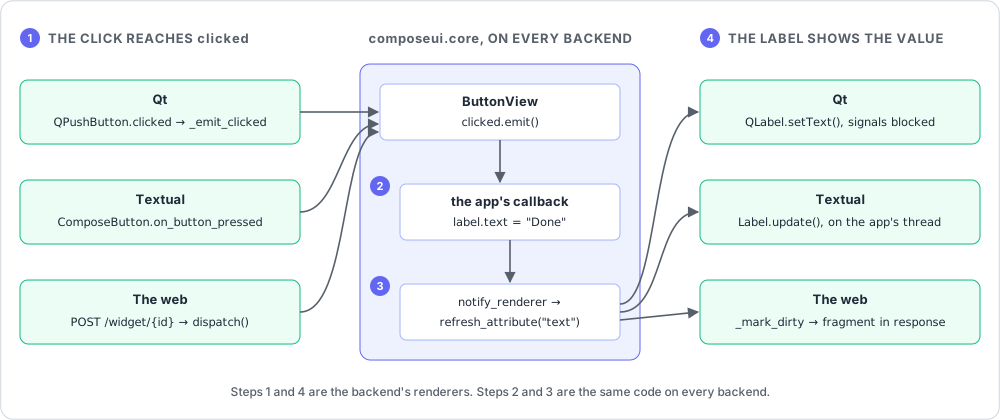
The button’s renderer emits the view’s signal. It turns the toolkit’s click into the
clickedsignal of theButtonView.The signal runs the callback.
Signal.emitcalls each connected callback, with the arguments that it injects (see Signals).The view notifies its renderer. The callback sets
label.text = "Done".notify_renderercompares the new value with the old one, and callsrefresh_attribute("text", "Done")on the label’s renderer.The renderer shows the value. The
"text"handler of the label renderer’s_refresh_dispatcherchanges the toolkit’s widget.
Steps 2 and 3 are in composeui.core, and are the same on every backend. Steps 1 and 4 are
the backend’s:
Qt. The button is a
QPushButton. Its Qtclickedsignal callsQtButtonRenderer._emit_clicked, which emits the view’sclicked. The click and the callback run in Qt’s event loop, on the main thread. The label’s"text"handler callsQLabel.setText.QtWidgetRenderer.refresh_attributeblocks the widget’s signals while it sets the value. So the widget does not send the app’s own change back to the view as an edit of the user.Textual. The button is a
ComposeButton, a TextualButton. Itson_button_pressedemits its ownclickedsignal, which is connected to the view’s. The click and the callback run in the app’s event loop. The label’s"text"handler callsLabel.update.TextualWidgetRenderer.refresh_attributegoes throughcall_on_main_thread, which calls the handler directly on the app’s own thread. A widget that is not mounted yet, for example on a screen that is not shown, gets its state when it is mounted (_is_waiting_to_mount).The web. The button is a
<button>element in the browser. htmx posts the click to the server, andWebButtonRenderer.dispatchemits the view’sclicked. No widget lives between two requests. So the label’s"text"handler,_mark_dirty, changes nothing in the page: it marks the renderer dirty, and the server sends the label’s fragment in its response. See A button click on the web.
A change can also come from another thread, for example a job’s. call_on_main_thread hands
it over:
Qt. It queues the change on Qt’s main thread (
_MainThreadInvoker).Textual. It runs the change with
App.call_from_thread.The web. It runs the change under the session’s lock. The next response, or the next fetch of
/jobs, sends the change.
The web backend
The web backend renders HTML on the server and updates the page with htmx. Its design
decisions are in “Design notes for the web backend” in ROADMAP.md. Read
them before you change composeui.webcore.
The id is the rendered object. The web has no live widget between two requests. A web renderer’s rendered object is the id of its HTML fragment,
cui-{id(view)}-{role}.One main view per session. Each browser session has its own main view, in a
WebSession(session.py).WebApplication.connectrecords each connection, and connects it again on the main view of each new session.Events go in, fragments come out. An event goes to the server. The response sends back the fragments that the event changed, and htmx swaps them into the page.
A button click on the web
This is the click of A button click on the web, step by step:
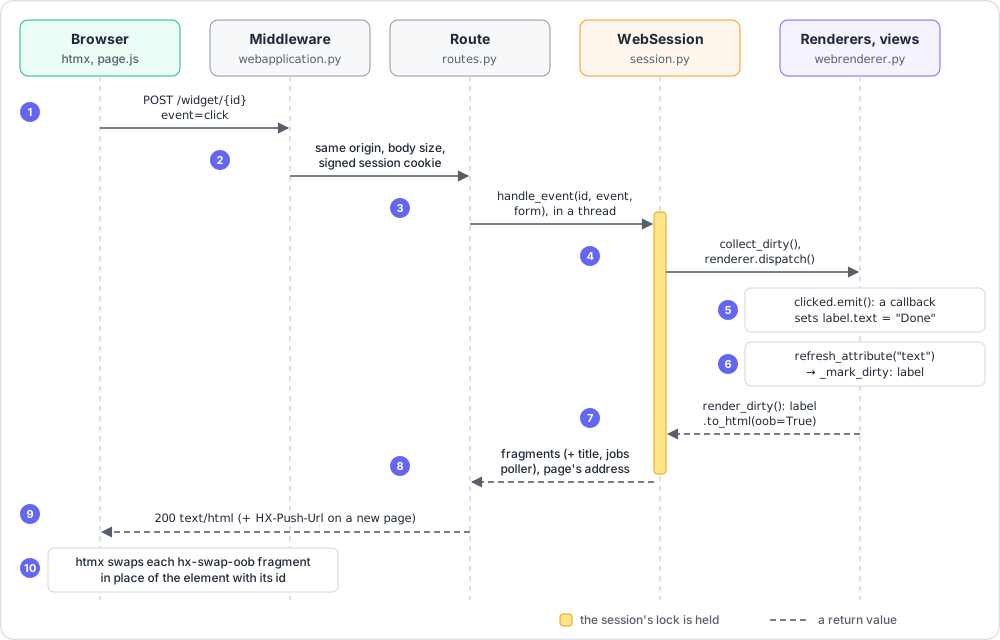
The browser posts the event. The button’s fragment (
WebButtonRenderer.to_html) hashx-post="/widget/{id}"andhx-valswithevent=click. Itshx-swap="none"tells htmx not to swap the button with the response.The middleware checks the request.
create_starlette_appinwebapplication.pyadds the middleware.SecurityHeadersMiddleware(headers.py) adds the security headers to every response.BodySizeLimitMiddleware(limits.py) refuses a body that is too large.SameOriginMiddleware(origin.py) refuses a request from another origin. Starlette’sSessionMiddlewarereads the signed session cookie.The route finds the session.
widget_event(routes.py) gets the session from the cookie’s id. When the session is gone, the response hasHX-Refresh, and the page reloads with a new session. Otherwise, the route callsWebSession.handle_eventin a thread: the app’s callbacks are synchronous code, and must not block the event loop.The session dispatches the event.
handle_eventfinds the renderer by its id in the session’s ownrenderers. An id of another session is not found._respondtakes the session’s lock and openscollect_dirty(), a set of dirty renderers for this request. Then it callsWebButtonRenderer.dispatch, which refuses the click when the button is disabled.The signal runs the callback.
dispatchemitsclicked. The callback setslabel.text = "Done".The label’s renderer becomes dirty.
notify_renderer, theon_setattrhook of every view field, calls the renderer’srefresh_attribute("text", ...). The handler in the_refresh_dispatcherofWebLabelRendereris_mark_dirty. It only adds the renderer to the dirty set: the renderer renders nothing yet.The session renders the dirty fragments.
_respondadds the renderers that a thread changed since the last response (take_pending) to the dirty ones.render_dirtycallsto_html(oob=True)on each, which addshx-swap-oob="true"to the root element. It drops a fragment that another dirty fragment contains, else htmx would swap it twice.The session adds the page’s fragments. When the event changed the main view’s title, language, or running jobs,
_respondadds their fragments too. When the event opened another page,_respondalso returns the page’s address.The route responds.
_widget_responsesends the fragments as HTML. With a new page, it addsHX-Push-Url, which puts the address in the browser’s history. When the app closed (the Exit action), it drops the session and responds withHX-Redirectto/.htmx swaps the fragments. htmx puts each
hx-swap-oobfragment in place of the element with the same id. The label shows “Done”. The button stays as it is.
The other routes follow the same steps. widget_file gives an upload to the session in place of
a form. jobs_poll runs no event: its response sends the changes that the threads made.
Reloading on a change
--reload runs the app’s changed code each time that a Python file is saved. The user guide says
what the user sees
(Reloading the app on a change). Qt
and Textual use composeui.core.reload, without a toolkit. The web uses uvicorn’s reload.
Reloading on Qt
On Qt, --reload works like this:
A supervisor process. With
--reload, the process that the user starts runsrun_reloadingand shows no window. It runs the same command line again in a child process (program_command). TheCOMPOSEUI_RELOADEDenvironment variable marks the child, so the child shows the app and does not start a supervisor of its own. The variable holds a scratch directory that the two processes share.Watching the files.
watch_changeswatches the Python files under the current directory. It skips hidden directories,__pycache__,node_modules, andsite-packages. With watchfiles, the system reports the changes (force_polling=False). Without watchfiles, and for a Windows drive under WSL (has_change_events), the supervisor compares the modification times every half second. watchfiles polls everywhere on WSL by default, and its polling misses changes.The change request. On a change, the supervisor writes the paths of the changed files to the
changesfile of the scratch directory. The app looks for it every 200 ms, and takes it: it renames it totaken(take_changes). From then on, the supervisor waits for the app as long as the app needs. While a modal dialog is open, the app waits until it closes: a dialog’s own event loop also runs the timer, and its callback goes on with the app after it. Then the app saves the study to the same directory (save_reloaded_state): the view state, the model’s data, and insession.jsonthe study file’s path and the language shown.In place. When only the app’s own code changed (
can_reload_in_place),rerun_programremoves the program’s modules fromsys.modules. These are the modules under the current directory, without ComposeUI’s. Then it runs the program again as a new__main__. The app’sruncallskeep_rerun, which keeps the new app and ends the program there, asrunwould._Reloadsopens the study in the new main view. It detaches the previous views from their widgets (_forget_widgets), and renders the new main view into the sameQMainWindow(QtMainRenderer(view, window)removes the previous bars, menus, and sidebar). Then the app removes thetakenfile (acknowledge_changes), and the supervisor keeps it running.In a new process. When ComposeUI’s own code changed, the app exits after it saves the study. It does the same when the new main view fails to show. The supervisor then starts a new child, which opens the study (
load_reloaded_state). It does the same when the app does not take the request within 5 seconds, after it terminates it. When the program fails while it runs again, for example on a syntax error, the app logs the error, keeps the previous code, and answers.
The supervisor stops its child when it exits, also on Ctrl+C or kill (SIGTERM).
Reloading on Textual
Textual has the supervisor and the change request of Qt, but not the reload in place: its app
saves the study and exits on every request, and the supervisor starts a new child. Its
timer starts once the Textual app is mounted (mounted_callbacks). The supervisor logs a
change only after the app answered or exited, so it never prints over a terminal app.
Reloading on the web
The web’s --reload is uvicorn’s, which restarts the server process. The web app only tells
watchfiles not to poll where the system reports the changes. Its sessions outlive the
processes: the process that run starts makes a scratch directory and a key that signs
the session cookies, and gives both to the server’s processes through environment
variables. Each process saves its sessions as it stops, in its lifespan’s end
(SessionStore.save_all, with save_reloaded_state). The next opens a session there
when its cookie comes back, under the same id (SessionStore._restore). Its pages ask
GET /reload every second, naming the process that served them (reload_poller):
another process answers with HX-Refresh.
Add a widget
Define the view in
core/view.py. Set its_renderer_key, and give it a class docstring: the widget catalog shows its first paragraph.@define_view class LabelView(LabelMixin, View): _renderer_key = "label"
In each backend, add a renderer and its
RENDERERSentry ("label": QtLabelRenderer). The renderer registers a handler per view attribute and creates its rendered object inrender:class QtLabelRenderer(QtWidgetRenderer[LabelViewLike, QLabel]): def __init__(self, view: LabelViewLike) -> None: super().__init__(view) self._refresh_dispatcher.update( { "text": self._refresh_text, } ) def render(self) -> None: if self._rendered_object is None: self._rendered_object = QLabel() self.refresh() @staticmethod def _refresh_text(_view: LabelViewLike, rendered_object: QLabel, value: str) -> None: rendered_object.setText(value)
When the user can change the widget,
renderalso connects the widget’s signal to a method. The method sets the view attribute insidestop_refresh(), asQtInputRendererdoes for the text of aQLineEdit.A web renderer has no widget to keep. It renders its fragment in
to_html, and applies the browser’s events to the view indispatch. Its handlers mark it dirty (_mark_dirty). See A button click on the web.Add tests for each backend that exercise the real rendered widgets. See Tests.
Document the widget in the user guide, and delete its entry in
ROADMAP.md. When an example app uses the widget, update the examples guide too.
Add a backend
Add one
RendererTypemember incore/registry.py, with theBackendpaths of the new modules, and the extra inpyproject.tomlthat installs its dependencies.In the renderers module of the new backend, add a
RENDERERSmapping.In its application module, add its application classes as
APPLICATIONandMODEL_APPLICATION. They are built frombuild_main_view=, plusbuild_model=andsetup_model=for the model application.Add the new backend’s
RENDERERStotest_every_backend_registers_the_same_renderer_keys_except_graphical_mapsintests/test_renderer_registry.py. Register each supported view; Textual omits maps. Then add tests for its renderers and its application. See Tests.Add the backend and its extra to the “Backends” table of the user guide. In each feature section of the user guide, say what the new backend shows, as the section does for Qt, Textual, and the web.
core/view.py should not need changes. run reads the --backend choices from
RendererType, so the new backend is one of them.
Development
Setup
ComposeUI uses uv and Python 3.9 or later. .python-version
pins 3.9. Install every backend, because the tests cover Qt, Textual, and the web:
uv sync --group dev --all-extras # extras: pyside6, tui (Textual), web (Starlette), report, reload, dataframe
Always run the tools through uv run or the make targets, never a global Python.
Commands
make lint          # ruff format + ruff check --fix
make mypy          # mypy on composeui, examples and tests, Qt binding resolved to PySide6
make typecheck     # mypy on source + tests; Pyright, Pyrefly and ty on tests
make pyright pyrefly ty  # individual test checkers
make zuban         # optional test checker; currently reports known incompatibilities
make test          # pytest in parallel, with coverage (browser tests excluded)
make browser-test  # the web backend in headless Chromium (tests/test_browser.py, Playwright)
make translations  # each app's catalogs against the text it translates
make check         # lint + mypy + translations
make all           # clean + check + test
make css           # rebuild webcore/static/app.css after changing classes in webcore
make web-deps      # download htmx, uPlot, Cally and deck.gl at pinned versions (commit them)
make docs          # build the documentation site into docs/_build/html
make screenshots   # the screenshots of the examples guide, on every backend
On Windows without make, run the same targets in PowerShell with make.ps1, such as
.\make.ps1 check test. Pass EXAMPLES as -Examples pipeform, batman and
TAILWIND_PLATFORM as -TailwindPlatform. When you change a target in the Makefile,
change it in make.ps1 too.
make mypy checks source, examples and tests together. It installs the browser group and
all extras so every test import resolves; Chromium is not needed. The other checker targets
also install the typecheck group. Use an individual target to run one checker, or
.\make.ps1 typecheck on Windows.
Zuban is excluded from the aggregate target. make zuban retains its nonzero exit status
when diagnostics remain.
Run the examples with uv run python -m examples.pipeform --backend qt, or textual, or
web.
Tests
Every behavior change needs a test in tests/.
Backend tests exercise real rendered widgets:
qtbotfor Qt,App.run_test()for Textual, and thehttpxor Starlette test client for the web.Tests for an optional backend guard with
pytest.importorskip(...).make testruns the tests in parallel, a worker per CPU (pytest-xdist). So a test must not depend on the state or the order of another.pytestwithout-nruns them one after another.A test that reads what a worker thread or a job does waits for that work, not for a fixed number of pauses. After a Textual file action (Open, Save, Save As,
PickFileAction), callawait app.workers.wait_for_complete(). For a job, callmain_view.jobs.wait(). On Qt, useqtbot.waitUntil(...). A fixed wait passes on a fast machine and fails on a slow CI runner, such as Windows with Python 3.9.Qt tests in a headless environment (CI, WSL) need
QT_QPA_PLATFORM=offscreen.make testsets it. To run one file or test:QT_QPA_PLATFORM=offscreen uv run pytest tests/test_qtrenderer.py -k combobox
What only a browser shows, such as the page’s scripts and htmx swaps, goes in
tests/test_browser.py, markedbrowser. These tests need thebrowsergroup and Chromium. Install Chromium once withuv run --group browser playwright install chromium, then runmake browser-test.make testfails when the coverage of lines and branches is below 100% (fail_underinpyproject.toml). Coverage also counts the child processes that the reload tests start. Add a test with each new line. When no test can reach a line, mark it# pragma: no coverand say why in a comment.A line that only POSIX runs, such as the kill of a process that ignores its termination, gets a
# posix onlycomment. On Windows,make.ps1setsCOMPOSEUI_POSIX_ONLY, and coverage leaves these lines out.
Translations
make translations checks the catalogs of each app in TRANSLATED_MAIN_VIEWS of the
Makefile, and make.ps1 has the same list in $TranslatedMainViews. When you translate a
new app, add its main view to both. See
Checking the catalogs.
Styles of the web backend
webcore/static/app.css is built from css/ with Tailwind and daisyUI. When you change
the classes used in webcore, run make css, and commit the built file. make css
downloads the Tailwind CLI and the daisyUI files once, into css/vendor/, which is not
committed. It needs no Node or npm. It checks the SHA-256 of each file against the one in the
Makefile and make.ps1, and fails when they differ. When you change TAILWIND_VERSION or
DAISYUI_VERSION, change the SHA-256 values in both files, and delete css/vendor/. A new
daisyUI version also needs make web-deps, which downloads its license.
The page’s scripts are committed in webcore/static/: htmx, uPlot, Cally, and deck.gl.
uPlot’s stylesheet, css/uPlot.min.css, is committed too. The package then needs no
download, and the page works offline. make web-deps downloads these files from npm at the
versions in the Makefile, and checks their SHA-256. It adds Cally’s license to cally.js
as a comment. It keeps the licenses of deck.gl and uPlot beside their scripts, in
deckgl.LICENSE and uPlot.LICENSE, and daisyUI’s beside app.css, in daisyui.LICENSE.
To update one of them:
Change its version and its SHA-256 in the
Makefileand inmake.ps1.Change its version in the comments of
webcore/page.py.Run
make web-deps css, then the tests, and commit the files.
Code style
rufflints withselect = ["ALL"]and a line length of 100.pyproject.tomlhas the ignore list. Fix lint properly rather than addingnoqa, unless it is clearly justified.mypymust pass. Fully type-annotate new code: the package shipspy.typed.Every Python module starts with
from __future__ import annotations, after its docstring. Ruff enforces it (required-imports, rule I002), andmake lintadds it to a new file. The annotations are then strings:Do not quote them.
Define the views that
attrsandcattrsresolve at module level, not inside a function, so that their field types resolve from the module’s globals.Give a
cattrshook its type explicitly, withCONVERTER.register_structure_hook(cls, func), not as a bare decorator, which reads the annotation.
Stay compatible with Python 3.9. In the annotations that
attrsandcattrsevaluate at runtime, such as view fields, useOptional[...]andUnion[...], notX | Y.In
qtcore, import Qt fromqtpy, never fromPySide6orPyQt*.In
webcore, build HTML withMarkup(template).format(...)frommarkupsafe, never with an f-string.formatescapes every value that isn’tMarkupitself.Put imports that only typing needs under
if TYPE_CHECKING:.The
__all__of each module ofcomposeui.coreis its public API. The API reference shows only these names, andtests/test_docs.pychecks that the docs and the examples import no other name. Add a name that apps use to__all__. The other names, also those that the backends import, can change in any release.Match the comment density of the code around: brief docstrings, and comments that explain why.
Documentation site
make docs builds the documentation site with Sphinx and MyST into docs/_build/html.
The site holds the guides, a widget catalog, and an API reference. Install the docs group
and every extra first, because the API reference imports the application module of each
backend:
uv sync --group dev --group docs --all-extras
The guides stay Markdown. MyST reads
docs/*.mdanddocs/user-guide/*.mdas they are. A link from a guide to a file outsidedocs/, such as../src/examples/pipeform.py, goes to that file on GitHub (docs/conf.py).The user guide is a page per topic.
docs/user-guide.mdlists the pages ofdocs/user-guide/and their sections, and itstoctreeorders them. A new page goes in both.The API reference is built from the docstrings. Each page in
docs/api/runsautomodulein an{eval-rst}block, because autodoc writes reStructuredText. In a docstring, single backticks link to the name they hold. When you add a module tocomposeui.core, add its page and its entry indocs/api/index.md.The widget catalog is built from the views. The
widget-catalogdirective (docs/_ext/widgetcatalog.py) lists each view ofcomposeui.core.viewthat has a_renderer_key, with the first paragraph of its docstring. A column per backend says whether itsRENDERERShas the key. A new widget, or a new backend, is in the catalog without a change todocs/widgets.md.A warning fails the build, as a broken link or a docstring that autodoc cannot read.
make testchecks the examples and the navigation (tests/test_docs.py). Each name that a Python block of the README, the guides, or the skill imports fromcomposeuimust exist. A block that defines every name it uses must run, in a scratch directory, and a block that definestest_functions must pass under pytest.docs/user-guide.mdmust list the##and###headings of the guide’s pages, and the README’s relative links must lead to files.The screenshots of the examples are taken by a script.
make screenshotsrunsdocs/screenshots.py, which writesdocs/images/<example>-<backend>.pngfor Qt, Textual, and the web, in the light theme. The script sets each example up first, for example by filling in its form or running its job, so every backend shows the same state. It needs thebrowsergroup and Chromium, asmake browser-testdoes. When an example changes what it shows, update its set-up in the script, runmake screenshots EXAMPLES=<example>, and commit the images. The script also takesdocs/images/quickstart-web.pngfor the README. It runs the code of the README’s quickstart, so runmake screenshots EXAMPLES=quickstartwhen the quickstart changes.
Continuous integration
.github/workflows/ci.yml runs on every pull request and every push to main. It runs
the lint, make mypy, make translations, and make test on Python 3.9 to 3.14, and
make browser-test and make docs on Python 3.13. On Windows, it runs
.\make.ps1 translations test, and on macOS make translations test, on Python 3.9 and
3.14. Run make check test before you commit.
The existing mypy matrix checks source, examples and tests together. Separate jobs run
make pyright, make pyrefly, and make ty on tests on Python 3.9, matching their
configuration. Failures in these jobs fail the workflow. An additional
make zuban job is non-blocking while its known incompatibilities remain. Run
make typecheck locally to run all four blocking type checkers.
A change of the documentation only, in docs/ and the Markdown files, runs only the docs
job. That job also lints the Python files of docs/.
On a push to main, the pages job publishes the site that make docs built to GitHub
Pages, at https://ehmoussi.github.io/composeui/. A pull request only builds the site.
Release
.github/workflows/release.yml publishes the package to PyPI with
Trusted Publishing: PyPI trusts the workflow,
so the repository stores no token.
Once, on PyPI and on
TestPyPI, add a publisher for the
project composeui: the owner ehmoussi, the repository composeui, the workflow
release.yml, and the environment pypi (testpypi on TestPyPI). In the repository’s
settings, add the two environments.
To release a version, for example 0.3.0:
Try it on TestPyPI: in the repository’s Actions, run the Release workflow on
main. It publishes a development version. setuptools-scm numbers it after the last tag, with its next patch version, such as0.2.1.dev12afterv0.2.0: only the tag gives the release’s version. Install it in a new environment, its dependencies from PyPI, and run the quickstart:pip install --index-url https://test.pypi.org/simple/ \ --extra-index-url https://pypi.org/simple/ "composeui[web]==0.2.1.dev12"
On
main, give the version’s entry inCHANGELOG.mdits date (## [0.3.0] - 2026-11-20), and set thecomposeui-versionof the agent skill and its text to the minor version (0.3).Tag
main’s commit, and push the tag. Name the commit: a pull request is squash-merged, so its branch’s commit is not inmain’s history, and a tag on it would leave the next development versions counting from the previous tag.git fetch origin git tag -a v0.3.0 -m v0.3.0 origin/main git push origin v0.3.0
The tag runs the tests again, then builds the package. Before it publishes, the workflow
checks that the build’s version is the tag’s, and that CHANGELOG.md has a dated entry for
it; the tests check the skill’s version. Then it publishes to PyPI, and creates the tag’s
GitHub release, with the changelog entry as its notes and the built files.